



A résumé can tell you where someone has worked, and an interview can reveal how well they explain their experience. Neither necessarily shows how a candidate will react when a customer is angry, priorities suddenly conflict, or two teammates disagree.
That’s where situational judgment tests can add another useful level of information.
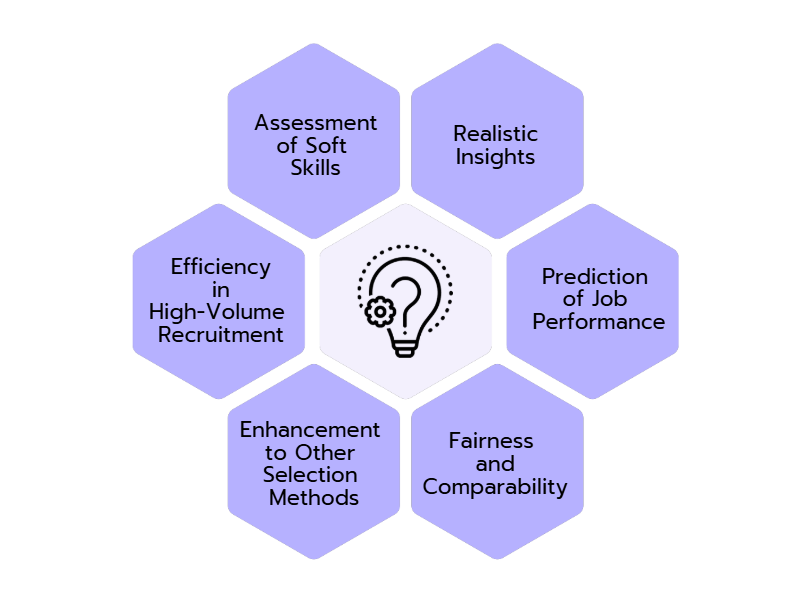
Situational judgment tests (SJTs) put candidates into realistic workplace situations and ask them to choose how they would respond. Instead of relying entirely on what someone says about communication, problem-solving, teamwork, or leadership, you can see those skills reflected in their decisions.
For HR professionals and hiring managers, an SJT can provide a structured way to screen candidates before making an offer. In this post, you’ll learn how to design, build, score, and send your own situational judgment test using Agolix. We’ll also work through a complete situational judgment sample so you can see how the process works from scenario to score.
What Is a Situational Judgment Test?
Put simply, it’s an assessment that gives someone a realistic work scenario and asks what they would do next. According to PrepLounge, SJTs are primarily used to assess essential personal traits and skills beyond technical qualifications.
Imagine you’re hiring a customer service representative. Instead of asking, “Are you good at handling difficult customers?” you might present this situation:
“A customer contacts you for the third time about an unresolved problem. They’re frustrated and demand an immediate refund, but issuing one requires supervisor approval. Your supervisor is currently unavailable. What do you do?”
The candidate then selects from several possible responses.
Situational judgment assessments focus primarily on judgment, behavior, and decision-making rather than testing whether a candidate can recall facts. They’re sometimes called low-fidelity simulations: they recreate the decisions someone might face at work without trying to reproduce the whole workplace.
The U.S. Office of Personnel Management notes that SJTs present applicants with situations they could encounter on the job, and possible ways of responding to those situations. In other words, situational judgment helps turn an abstract question, such as “Does this person make good decisions?” into something you can evaluate consistently.
What SJTs Measure and When to Use Them
An SJT can be designed around nearly any competency that involves making choices at work. Depending on the position, you might measure:
- Communication
- Conflict resolution
- Teamwork and collaboration
- Problem-solving
- Decision-making
- Leadership
- Ethics and integrity
- Customer orientation
- Prioritization
- Adaptability
The key is to measure competencies that actually matter for the role.
For example, conflict resolution might be essential for a frontline manager but less important for an individual contributor who primarily works independently. A customer-facing role might place much greater emphasis on communication and judgment under pressure.
SJTs can fit at several points in the talent process. They’re particularly useful for pre-interview screening, high-volume recruiting, jobs where interpersonal skills matter, and internal promotion or leadership decisions.
A standardized assessment also gives every candidate the same opportunity to demonstrate judgment. That can help teams add structure to screening rather than relying solely on informal impressions.
However, an SJT shouldn’t become your entire selection process. Think of your SJT as one useful data point alongside interviews, experience, work samples, references, and other job-relevant evidence.
Choosing a Test Format: Linear vs. Interactive
Before writing situational judgment questions, decide what kind of candidate experience you want to create: a straightforward linear testing format, or a more interactive testing format that changes based on the candidate’s responses.
A Linear Testing Format
A linear test is the simplest option, where every candidate receives the same scenarios in the same order. Because everyone responds to identical material, results are straightforward to compare.
For example, a customer service SJT might give every candidate the same five scenarios around handling an upset customer, prioritizing competing requests, and resolving a team conflict. In a linear format, the questions would be given in the same order, regardless of their answers.
This approach is simple to build and administer, while making it easier for hiring teams to compare responses and scores consistently across candidates.
An Interactive Testing Format
An interactive or branching assessment works differently. A candidate’s response to one scenario can determine what happens next.
For example, suppose a candidate chooses to escalate an unhappy customer’s complaint. The next question could show how the supervisor responds and ask the candidate what they would do next. Someone who chooses to handle the issue independently could receive a different follow-up scenario.
Branching can make an assessment feel more like an unfolding workplace situation, although it requires more planning.
You’ll also need to choose a response format. Common approaches include asking candidates to select what they would do, identifying the best response, choosing the most and least likely actions, or ranking several options from most to least effective.
Scenarios can be text-based or presented through video. Text scenarios are faster and less expensive to produce: candidates read a short paragraph and choose a response. Video can provide additional context when tone, body language, or interpersonal dynamics matter. Candidates can view a filmed scenario playing out and select from a set of responses after watching it unfold.
How to Design Your Situational Judgment Test
A good SJT starts with the job, not the assessment software.
Before writing situational judgment questions, identify the real decisions employees face and the behaviors that separate strong performers from average ones. The goal isn’t to trick candidates, but to recreate realistic situations where communication, problem-solving, teamwork, leadership, or other job-related competencies matter.
Start by talking with hiring managers, experienced employees, and other subject-matter experts. Ask which situations challenge new hires, where good judgment makes the biggest difference, and how top performers typically respond. Those insights give you the foundation for choosing competencies, developing realistic scenarios and response options, and creating a consistent scoring system.
Below are five steps to design your SJT.
1. Define the Competencies
Identify three to five competencies that distinguish strong performers. As a reminder, a competency is a job-related skill, behavior, or ability that can be demonstrated through how someone responds to a workplace situation. For an SJT, good competencies are things candidates can show through decisions.
Look at the job description, performance expectations, competency models, and feedback from current managers. Ask yourself, “When someone succeeds in this job, what do they consistently do well?”
Remember to avoid measuring every desirable characteristic. A shorter assessment focused on job-critical behaviors is usually more useful than a long test covering traits that barely affect performance.
2. Source Real Scenarios
Next, find situations in which those competencies actually show up.
One effective approach is to interview experienced employees and managers about “critical incidents,” aka specific moments when a person’s decision had a meaningful positive or negative result.
Ask questions such as:
- What difficult situations happen repeatedly in this role?
- What mistakes do new employees commonly make?
- When have you seen someone handle a challenging situation exceptionally well?
- What decision separates an average performer from an excellent one?
These conversations give you raw material grounded in the actual job.
3. Write the Scenario
Turn each incident into a short, specific scenario.
Give candidates enough information to make a decision, but don’t bury the challenge under unnecessary details. Avoid clues that make the preferred answer obvious.
For example, a leading scenario might say, “A frustrated customer complains about a delayed order. You know the best approach is to remain calm, listen carefully, and find a solution. What do you do?” This gives away the behaviors you want the candidate to select.
A better scenario would say, “A customer contacts you about an order that is three days late. They’re frustrated and want the problem resolved immediately. Tracking shows the package is still in transit. What do you do?” This provides the facts candidates need while leaving them to decide how they would handle the situation.
Also, check scenarios for assumptions that aren’t relevant to job performance. Cultural references, unnecessary jargon, stereotypes, or experiences available only to particular groups can introduce excess noise and bias into the assessment.
4. Write the Response Options
Every response should sound like something a real employee might reasonably consider doing. If you only provide one professional response and three obviously terrible ones, you’re mostly measuring whether candidates can spot the answer you want.
Instead, create realistic alternatives with meaningful tradeoffs.
For example, if two urgent assignments are due at the same time, candidates might choose to ask their manager which to prioritize, prioritize one themselves, ask a teammate for help, or attempt to finish both. Each option has a benefit and drawback, requiring candidates to weigh communication, initiative, workload, and risk, rather than spot an obvious answer.
A strong set might include an excellent response, a reasonable but incomplete response, a less effective response with understandable logic, and an action likely to make the situation worse.
5. Build the Scoring Key
Don’t create the answer key in isolation.
Ask experienced employees, subject-matter experts, and managers to evaluate the responses. Which action is most effective? Which is least effective? Why?
You might assign the best response 4 points, the next-best 3, a weak response 2, and the poorest response 1. Another approach is to award points only for preferred answers.
Whichever method you use, apply it consistently, and document why responses receive their scores.
A Sample Situational Judgment Test Question
We’ve talked a lot about SJTs, so let’s look at a real-world example. Here’s a situational judgment sample for a team-lead position:
Scenario: You’re leading a project with a deadline tomorrow. One team member tells you privately that another colleague hasn’t completed an important part of the work. The colleague in question has been dealing with several urgent customer issues this week. What would you do?
- Tell the team member who raised the problem to finish their colleague’s work so the deadline isn’t missed.
- Speak privately with the colleague responsible for the work, understand the situation, and agree on a realistic plan to complete or redistribute the remaining tasks.
- Immediately report the colleague to senior management because missing deadlines is unacceptable.
- Wait until tomorrow to see whether the colleague completes the work before getting involved.
A scoring key might award:
- B: 4 points. It addresses the problem directly, gathers information before making assumptions, and focuses on completing the work fairly.
- A: 3 points. It may protect the deadline, but it shifts responsibility without first understanding the problem and could create resentment.
- D: 2 points. It avoids a premature reaction, but waiting creates unnecessary deadline risk.
- C: 1 point. Escalation may eventually be appropriate, but immediate escalation skips opportunities to understand and resolve the issue.
Notice that the situational judgment questions aren’t built around cartoonishly good and bad answers. Several choices have some logic behind them. The goal is to distinguish levels of workplace judgment.
If you’re creating a situational judgment practice test for internal review, have several high-performing employees answer it before using it with applicants. Their feedback can expose unclear scenarios, multiple equally strong answers, or scoring assumptions you hadn’t noticed.
How to Build and Launch Your SJT in Agolix
Once your scenarios, responses, and scoring rules are ready, you can turn the content into a working assessment with Agolix.
Agolix is designed to let organizations create online assessments and generate useful results without building their own assessment infrastructure. You can explore the platform and start with Agolix before creating your hiring workflow.
1. Create the Assessment
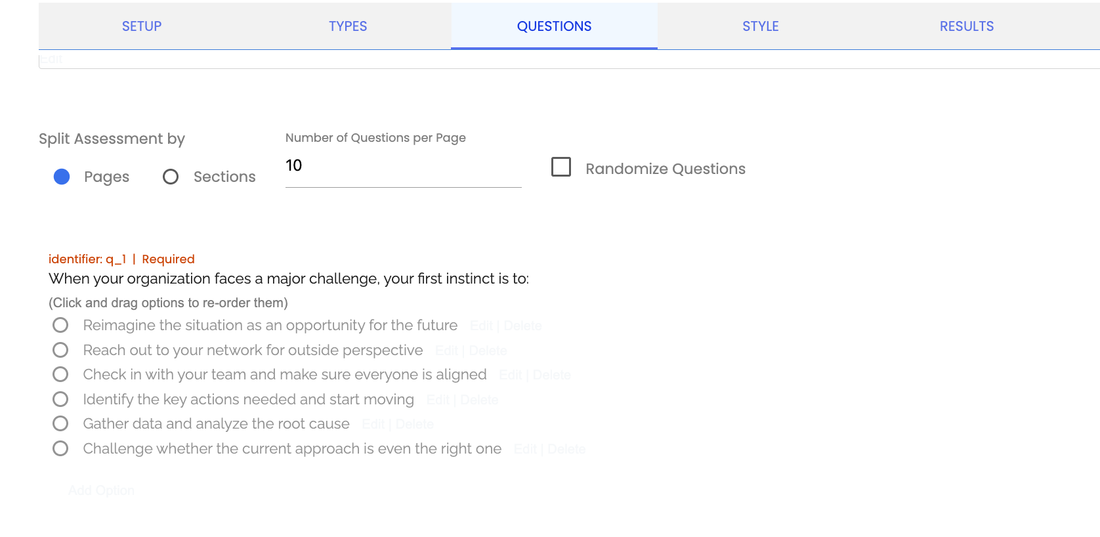
Create a new assessment and enter each workplace scenario as a question.
Add the response choices you developed during the design process. Keep formatting consistent so candidates can focus on the decisions rather than figuring out how each question works.
Use introductory instructions to explain what candidates should expect and how they should respond.
2. Add Branching Logic
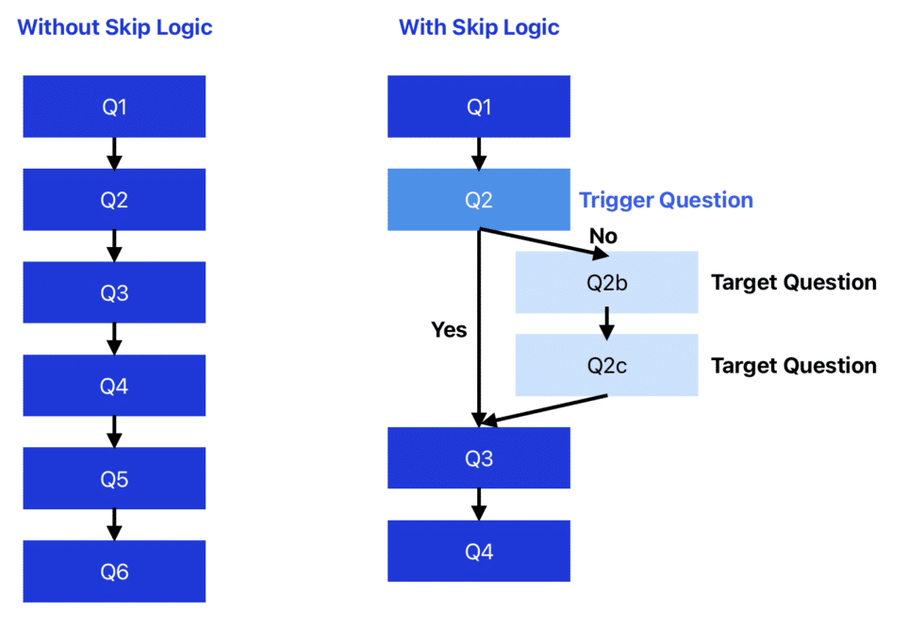
If you’re building an interactive SJT, use logic to send candidates to different follow-up questions based on their earlier responses.
Map the branches before building them. A simple flowchart can save considerable editing later.
Keep branching purposeful. A different path should reveal something meaningful about the competency you’re measuring, rather than simply making the assessment longer.
3. Set Up Scoring and Calculations
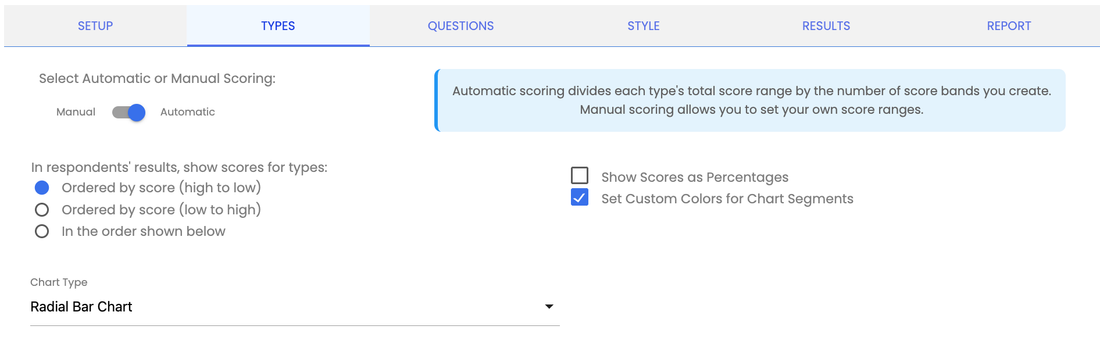
Connect each response to the scoring system you created with your subject-matter experts.
Automatic calculations can turn individual answers into overall scores or competency-level results. For example, you might calculate separate scores for communication, problem-solving, and leadership.
That gives hiring managers more useful information than a single overall number.
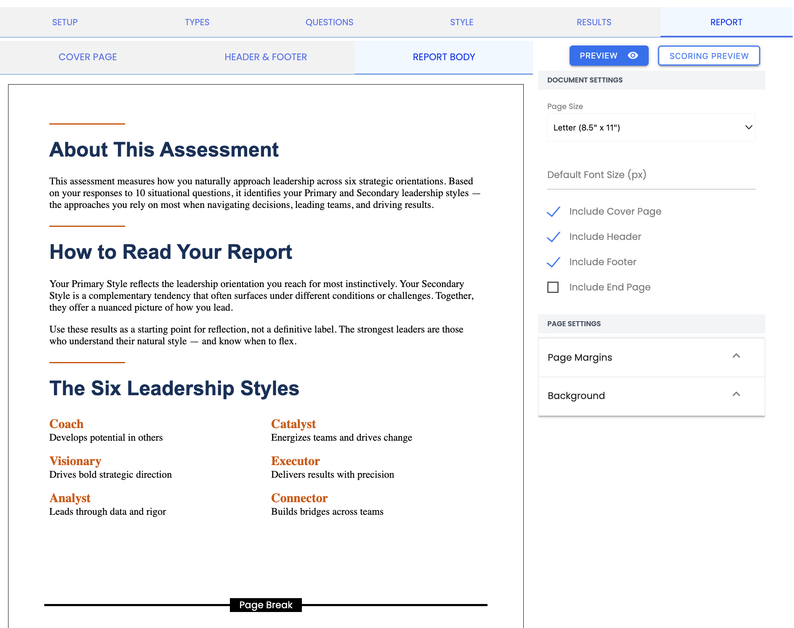
4. Auto-Generate Reports
Assessment results become more useful when they’re easy to interpret.
Configure your output so the hiring team can quickly understand what the candidate’s scores represent. A branded report might contain an overall result, competency-level scores, explanatory text, and recommended interview areas.
Depending on your assessment strategy, you can also provide candidates with an appropriate version of their results.
Agolix offers assessment software for building online assessments and reporting workflows without having to develop a custom application.
5. Test, Then Send
Before going live, complete the assessment yourself and ask several colleagues to do the same. Check the candidate experience on different devices, verify every scoring calculation, and confirm that branching sends people to the intended questions.
Once you’ve tested the assessment, send it to candidates and monitor responses in one place.
You don’t need to code a custom testing platform to turn your scenarios into a working assessment. Start an Agolix free trial and build a pilot SJT using a handful of real scenarios from your next open position.
How to Score, Compare, and Act on Results
An SJT score needs context.
A high score generally indicates that a candidate’s choices align closely with the behaviors your scoring panel identified as effective. A lower score suggests less alignment with those preferred responses. It doesn’t automatically mean someone is a poor employee.
Competency-level results can be particularly useful.
Suppose two candidates earn similar total scores, but Candidate A is stronger in conflict resolution while Candidate B scores higher in prioritization. If both advance, you can use structured interview questions to investigate those differences.
Compare candidates using the same assessment, scoring key, and administration process. Consistency makes results easier to interpret and helps prevent the criteria from shifting from candidate to candidate.
Most importantly, avoid treating an SJT score as the sole hiring decision. Combine it with other job-related information for a more complete picture. The U.S. Equal Employment Opportunity Commission provides guidance on employment tests and selection procedures, which is worth reviewing when incorporating assessments into hiring.
Best Practices and Common Pitfalls to Avoid
Building the first version of your SJT isn’t the end of the process. Treat the assessment as something you can evaluate and improve.
Keep these principles in mind:
- Check scenarios for bias and accessibility. Remove details unrelated to successful job performance and make the assessment usable by candidates with different needs.
- Make every option plausible. Answers that are too obvious make the assessment easy to game.
- Use job experts. Involve experienced employees when identifying scenarios and developing the scoring key.
- Pilot before launch. Test questions with employees or other appropriate reviewers before using them for selection.
- Look at outcomes. Over time, compare assessment results with relevant job-performance measures to see whether the test is providing useful information.
- Revisit the content. Jobs change. Update scenarios when processes, technology, responsibilities, or organizational priorities change.
- Keep human judgment in the process. An assessment should support a hiring decision, not replace thoughtful evaluation.
If an assessment will materially influence employment decisions, consider having qualified HR, legal, or industrial-organizational psychology professionals review your approach, particularly when establishing validation and compliance procedures.
Turn Workplace Judgment Into Better Hiring Data
Hiring teams often talk about culture fit, when what they really need is clearer evidence about how someone might approach the work.
A well-designed situational judgment test can make that evaluation more consistent. Candidates face the same realistic problems, their responses connect to job-relevant competencies, and hiring teams gain comparable information to use alongside interviews and other selection methods.
Start your Agolix free trial and build your first situational judgment test today. Use a real position you’re currently hiring for, create your first few scenarios, and see how structured SJTs add value to your hiring process.