

360° Assessments and Workflow are available for Professional level subscription plans. Explore this Assessment Evaluation Format with our 2-week free trial.
Video Guide #
What Is a 360° Assessment? A Simple Walkthrough
(Video link opens in a new browser tab)
Key Terms #
360° Assessment #
A 360° assessment is a structured feedback process that evaluates an individual’s performance, behavior, and competencies from multiple perspectives. It typically includes input from the individual themselves, as well as peers, direct reports, and managers, offering a balanced view of strengths and areas for growth. The aim is to provide constructive insights that support both personal and professional development. This approach is commonly used in leadership development, performance reviews, and enhancing team effectiveness. Use Narrative questions to gather qualitative results and any other question format for quantitative results.
360° Workflow #
A 360° Workflow is a customizable framework for managing the 360° assessment process. It allows you to define evaluator roles, select participants, schedule reminder emails, and control when and how reports are delivered. A single 360° assessment can be used across multiple workflows, each with its own specific roles and delivery settings.
Subject #
A Subject is the individual or organization being evaluated in a 360° assessment. Feedback is gathered about the subject from various evaluators to provide a well-rounded view of their performance, behaviors, and competencies.
Evaluator #
An Evaluator is a person who provides feedback about the Subject in a 360° assessment. Evaluators may include peers, managers, direct reports, or others who can offer valuable insights based on their relationship with the Subject.
Role #
A Role defines the relationship between an Evaluator and the Subject in a 360° assessment. Common roles include Peer, Supervisor, Direct Report, and others, and are used to group and compare feedback based on perspective.
The 360° Evaluation Process #
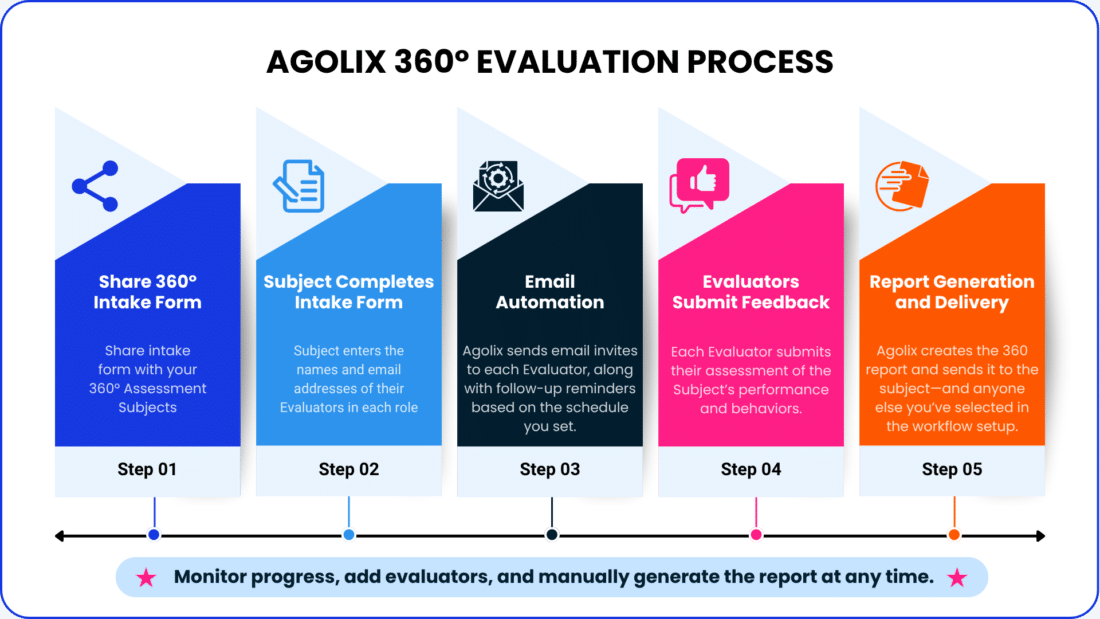
The 360° Assessment process begins when you send the intake form link to the subject. The subject enters their name, email address, and the contact information of the evaluators for each role—such as peers, direct reports, or supervisors.
Once submitted, Agolix takes it from there. The platform automatically sends personalized email invitations to each evaluator, along with gentle reminder emails based on your settings.
Evaluators complete their assessments of the subject, providing valuable, role-based feedback. When the evaluations are in, Agolix generates a detailed 360° report and delivers it to the subject and any additional recipients you’ve specified in the workflow setup.
Throughout the process, the Agolix account holder can monitor progress, add evaluators if needed, and manually trigger report generation at any time.
Take a look at the diagram below for a step-by-step visual of the process.
360° Assessment Lifecycle #
There are 4 steps to the 360° Assessment Lifecycle:
- Build the 360° Assessment
- Add questions, scoring & feedback settings, styling, notifications, and a customized PDF report
- Build the 360° Workflow
- Configure evaluator invitations, reminders, and messaging; define evaluator roles; and set report delivery options
- Share Intake Form Link
- Share the intake form link with your 360° Assessment Subjects
- Monitor progress (as desired)
- Track evaluator progress, with options to update contact information, resend invitation links, and manually generate the PDF report.
Tip: You can use the AI-Powered Assessment Generator to build your 360° assessment and workflow automatically from a simple prompt — so you can skip straight to sharing your intake form link.

Please review the rest of the Reference Guide to learn more about our software.
Thank you for choosing Agolix!